SOP: Setting Up DMARC for a Domain
Purpose
To configure DMARC (Domain-based Message Authentication, Reporting & Conformance) for a domain in order to:
Prevent email spoofing
Improve deliverability
Monitor email authentication issues
Protect brand reputation
Who This Is For
Team members managing DNS
Email deliverability specialists
Anyone setting up SendGrid or email infrastructure
Time Required
5–10 minutes to set up
Up to 24 hours for DNS propagation
Prerequisites
Access to your domain DNS provider (GoDaddy, Cloudflare, Namecheap, etc.)
SPF and DKIM already configured (typically via SendGrid)
An email address to receive DMARC reports
(example: dmarc@yourdomain.com)
What DMARC Does (Plain English)
DMARC tells receiving email servers:
Which emails are legitimate
What to do with suspicious emails
Where to send authentication reports
It works on top of SPF and DKIM.
Step 1: Decide Your DMARC Policy
Choose how strict you want DMARC to be.
? Always start with p=none to avoid breaking legitimate email.
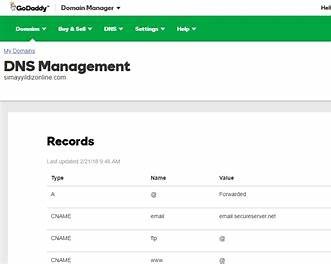
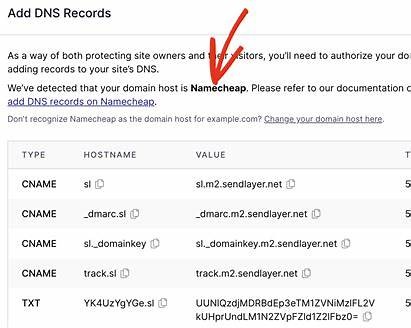
Step 2: Log in to Your DNS Provider
Log in to the platform where your domain’s DNS is managed.
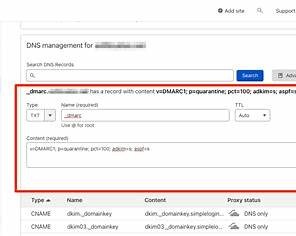
Step 3: Add a New DMARC DNS Record
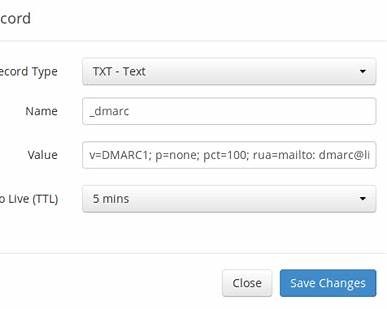
Create a TXT record with the following settings:
DNS Record Details
Type: TXT
Host / Name: _dmarc
TTL: Auto or Default
DMARC Value (Copy & Paste)
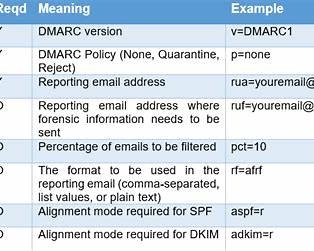
v=DMARC1; p=none; rua=mailto:dmarc@yourdomain.com; ruf=mailto:dmarc@yourdomain.com; fo=1
? Replace yourdomain.com with your actual domain.
Step 4: Save DNS Changes
Click Save
DNS propagation usually happens within minutes
May take up to 24 hours
No further action needed during propagation.
Step 5: Verify the DMARC Record
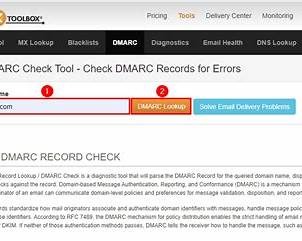
Use a verification tool to confirm the record is live.
Recommended tools:
Google Admin Toolbox → Check DMARC
MXToolbox → DMARC Lookup
You should see:
DMARC record detected
Policy = none
Step 6: Monitor DMARC Reports
DMARC reports will be sent to the email address you specified (rua and ruf).
These reports:
Come as XML files
Show which services send email on your behalf
Highlight failures or spoofing attempts
? DMARC reports often require a viewer or service to interpret.
Step 7: Gradually Strengthen Your Policy (Optional)
After 1–2 weeks of clean reports:
Update policy to:
p=quarantine
Monitor again
Upgrade to:
p=reject
⚠️ Only do this once you confirm all legitimate senders are authenticated.
Completion Checklist
DMARC TXT record added
Policy set to p=none
Record verified via lookup tool
DMARC reports received
SPF & DKIM passing
Best Practices
Use a dedicated inbox for DMARC reports
Never skip directly to p=reject
Re-check DMARC after adding new email tools
Document DNS changes internally
Why This Matters
Without DMARC:
Anyone can spoof your domain
Emails may land in spam
Brand trust is at risk
With DMARC:
Your domain is protected
Deliverability improves
You gain visibility and control
Was this article helpful?
That’s Great!
Thank you for your feedback
Sorry! We couldn't be helpful
Thank you for your feedback
Feedback sent
We appreciate your effort and will try to fix the article